Parameter Lists Rubocop
Rubocop is a Ruby static code analyzer. Rubocop utilizes a number of style rules, which it calls “Cops”, hence the name.
I picked a cop at random, and wanted to see what it looks for in my Ruby code. So let’s take a look at Parameter Lists
[code]
cd ~/workspace/davinci_coders_t1_2015/practice
mkdir parameter_list_rubocop
cd parameter_list_rubocop
echo ‘2.1.5’ > .ruby-version
echo ‘davinci_coders’ > .ruby-gemset
cd .
[/code]
Here I’m going into my practice directory and making a new one. I then setup the directory to have RVM load Ruby 2.1.5 and the davinci_coders gemset. Next I need to add the guard-rubocop gem.
[code]
# Gemfile
source ‘https://rubygems.org’
gem ‘guard-rubocop’
[/code]
Next we need to bundle in order to install these gems. Then we’ll initialize guard.
[code]
bundle
guard init
[/code]
Now we need to tell Guard to ignore the Guardfile.
[code]
# .rubocop.yml
AllCops:
Exclude:
– ‘Guardfile’
[/code]
We’ll fire up Guard, and we get no offenses. Let’s add a Ruby file called program_1.rb.
[code]
#!/usr/bin/env ruby
# I’m looking at https://github.com/bbatsov/rubocop/blob/master/lib/rubocop/cop/metrics/parameter_lists.rb
def foo(param1)
puts param1
end
def foo2(param1, param2)
puts param1, param2
end
def foo3(param1, param2, param3)
puts param1, param2, param3
end
def foo4(param1, param2, param3, param4)
puts param1, param2, param3, param4
end
def foo5(param1, param2, param3, param4, param5)
puts param1, param2, param3, param4, param5
end
def foo6(param1, param2, param3, param4, param5, param6)
puts param1, param2, param3, param4, param5, param6
end
def foo7(param1, param2, param3, param4, param5, param6, param7)
puts param1, param2, param3, param4, param5, param6, param7
end
def foo8(param1, param2, param3, param4, param5, param6, param7, param8)
puts param1, param2, param3, param4, param5, param6, param7, param8
end
[/code]
Now our guard gives us three offenses:
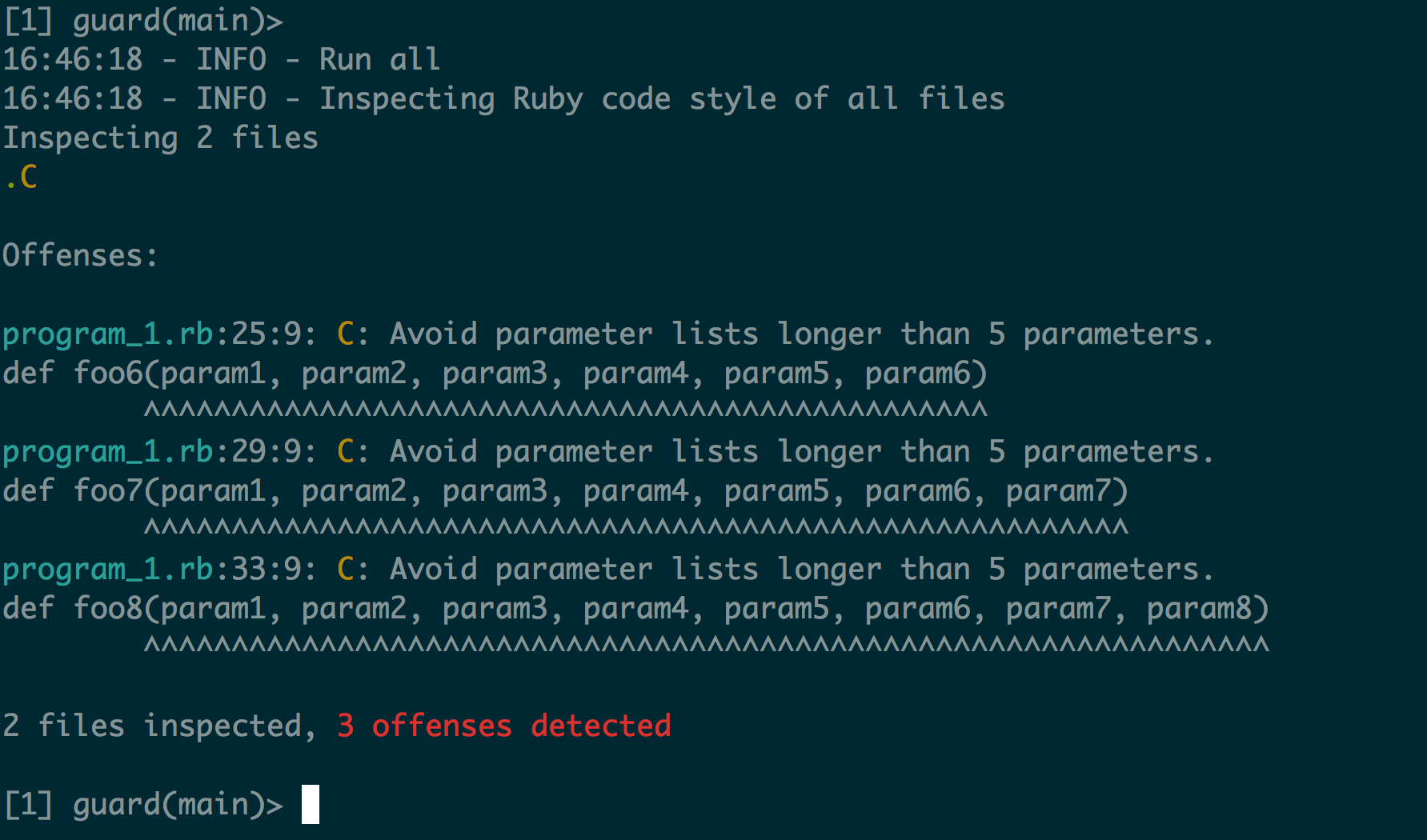
So it looks like Rubocop will complain if your method has more than 5 parameters. Looks like this preference comes from the Ruby Style Guide.
I’ll have to remember to have 4 or less parameters for any methods I create in the future.
Although, I could configure Rubocop to allow me up to 7 parameters:
[code]
# .rubocop.yml
Metrics/ParameterLists:
Max: 7
[/code]
No, that’s probably a bad idea. Nevermind.
Rebasing one branch onto another
Ok, I’m tired of looking this up, so I’m going to document it here for future me.
We have a branching strategy:
maint-2014.04.04
maint-2014.04.18
…
master
When I create a new branch based off master, I name it 1234567890_some_short_summary_master.
Later I determine it should have been based off maint-2014.04.04.
Here’s the process:
[code]
git checkout 1234567890_some_short_summary_master
git fetch upstream
git rebase upstream/master
git rebase –onto upstream/maint-2014.04.04 upstream/master 1234567890_some_short_summary_master
git branch -m 1234567890_some_short_summary_master 1234567890_some_short_summary_0404
[/code]
If this helps you, please let me know! 🙂
Source: git rebase –onto
Changing Font Size in RubyMine via the Keyboard
A co-worker asked if RubyMine has the ability to increase/decrease the font size (say if you were presenting on a projector). I didn’t know, but I researched it and here’s how you enable font size changes.
- First open RubyMine.
- Go to RubyMine -> Preferences.
- Select Keymap from the list on the left
- In the upper right search box, search for Font
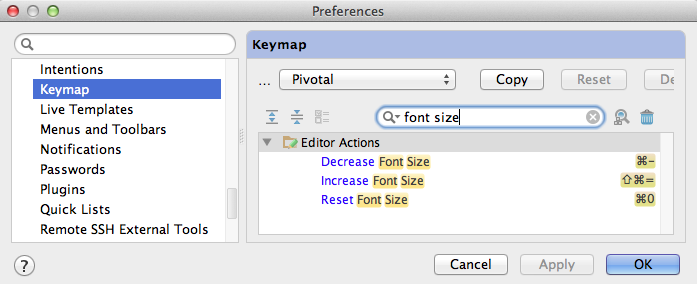
- You should see three options, namely Increase Font Size, Decrease Font Size and Reset Font Size
- Double click on each of these options to add a Keyboard shortcut.
- I added ⌘- (Cmnd-minus) for Decrease, ⇧⌘= (Cmnd-Shift-Plus/Equals) for Increase and ⌘0 for Reset
Podcasts I listen to…
Recently, one of my students Raj Solanki blogged about some podcasts that he recently found.
For the past month or so, I’ve been listening to several podcasts. I listen on my iPod, but I’ve found the built in Podcasts app frankly sucks. A co-worker introduced me to Downcast, which is an alternative which ROCKS.
My podcast list:
The Dave Ramsey Show
I plan to teach Financial Peace University in September
Freakonomics Radio
Giant Robots Smashing into other Giant Robots
iPhreaks Show
iOS based podcast
Penn’s Sunday School
Features Penn Jillette (of Penn & Teller fame) which makes it pretty funny
Ruby on Rails Podcast
This podcast is hosted by Sean Devine, and he talks with people in the Rails ecosystem
The Ruby Rogues
Features Charles Max Wood (he also does iPhreaks), Avdi Grimm (author of several Ruby books), James Edward Gray (Author of TextMate: Power Editing for the Mac), and several other powerhouses in the Ruby community.
Ruby 5
This one is interesting, the episodes are < 5 minutes, and they give you updates on things going on in the Ruby community. This podcast is how I realized RSpec 3 had been released.
The Software Apprenticeship Podcast
This podcast is put on by a Mentor and his Mentee, as they work through the apprentice coming on board.
That American Life / This American Life
These are both good podcasts on stories of American life. Recent episodes I enjoyed was “I was So High” and “Tarred and Feathered”.
What’s your favorite podcast?
Fixing inital Rubocop errors on Rails app
tl;dr: Solution
I’m an Ruby on Rails instructor for the DaVinci Coders program in Louisville, CO. I teach a class called Building the Toolbelt of a Junior Ruby on Rails Developer, where we teach students how to use Ruby on Rails, as well as the other tools software engineers use in their daily work.
Recently, we started working on the group projects. The group projects are the capstone project where each student pairs with one or more other students in implementing a fully developed Ruby on Rails application. This provides students the experience of coding a project from scratch, including Inception, adding/writing Tracker stories, and collaborating with others.
The first project is Geoviz. This project is going to allow users to upload datasets to the site, and allow for the creation of graphs, maps and data display.
One of the gems that they added to the project was Rubocop, which they tied into their Guard via Guard-Rubocop.
I was amazed to see A LOT of “offenses”, i.e. “39 offenses detected”. This is an app that has nothing more than the output of “rails new _____”, so that was rather surprising. Here’s how we fixed it:
We first started with running `rubocop –auto-correct`. This corrected 14 offenses by changing double quoted strings to single quoted strings. You could disable this test as well, but I think it’s “good” to use single quotes.
The next one we needed to solve:
[code]
app/controllers/application_controller.rb:1:1: C: Missing top-level class documentation comment.
class ApplicationController < ActionController::Base
^^^^^
[/code]
We decided this wasn’t really that helpful of a test, so we disabled it by creating a .rubocop.yml file
[code]
Documentation:
Enabled: false
[/code]
This got rid of another 4 offenses.
The rest of the offenses were lines being too long:
[code]
config/routes.rb:15:80: C: Line is too long. [80/79]
# Example of named route that can be invoked with purchase_url(id: product.id)
[/code]
I guess the Rails core team likes LOOOOOOONG lines. I simply edited the files and split the long lines into two < 80 character lines. [code] 24 files inspected, no offenses detected [/code] Yay!
Solution: Gem::RemoteFetcher::FetchError: SSL_connect issues
One of my previous students, Ross Kinney recently blogged about an error he encountered:
[code]
Gem::RemoteFetcher::FetchError: SSL_connect returned=1 errno=0 state=SSLv3 read server certificate B: certificate verify failed (https://s3.amazonaws.com/production.s3.rubygems.org/gems/multi_json-1.7.7.gem)
[/code]
It turns out that some of the OS X SSL Certs were out of date and he fixed it by running:
[code]
rvm osx-ssl-certs update all
[/code]
I had initially filed that away under “Good to know”, but after this weekend and yesterday, I’ve used this solution a half dozen or more times. Thanks Ross Kinney!
Updating requested_by for a bunch of Pivotal Tracker stories
I recently imported a bunch of stories into Pivotal Tracker via the Import CSV function. This worked like a charm, the problem was I wanted all the stories to be requested by a different user than what was in the CSV file.
I could use the web browser to do this, but that would take a while to update 85 stories.
I pulled out the Pivotal Tracker gem (Github | RubyGems) to see if it could help.
[ruby]
$ gem install pivotal-tracker
$ irb
>> require ‘pivotal-tracker’
=> true
>> PivotalTracker::Client.token = ‘12345678asdfghj’
=> "12345678asdfghj"
>> project = PivotalTracker::Project.find(456789)
=> #<PivotalTracker::Project:0x007fd128b9fe50 … >
>> project.stories.all(:requested_by => ‘John Doe’).count
=> 85
>> project.stories.all(:requested_by => ‘John Doe’).each{|story| story.update(:requested_by => ‘Jane Doe’) }
=> [#<PivotalTracker::Story:0x007fd12a28fa48 … ]
>> project = PivotalTracker::Project.find(456789)
=> #<PivotalTracker::Project:0x007fd128b9fe50 … >
>> project.stories.all(:requested_by => ‘John Doe’).count
=> 0
>>
[/ruby]
Note, I had to reload the project because the stories get cached by the pivotal-tracker gem.
Mysql 5.6.12 and mysql2 ruby gem 0.3.12
I recently updated my Homebrew install and installed the latest mysql (brew update && brew upgrade mysql) to 5.6.12.
However, when I tried to upgrade my mysql2 gem from 0.3.11 to 0.3.12, I was getting the following error:
[shell]
*** extconf.rb failed ***
Could not create Makefile due to some reason, probably lack of
necessary libraries and/or headers. Check the mkmf.log file for more
details. You may need configuration options.
Provided configuration options:
–with-opt-dir
–with-opt-include
–without-opt-include=${opt-dir}/include
–with-opt-lib
–without-opt-lib=${opt-dir}/lib
–with-make-prog
–without-make-prog
–srcdir=.
–curdir
–ruby=/Users/jasonn/.rvm/rubies/ruby-1.9.3-p392/bin/ruby
–with-mysql-config
Gem files will remain installed in /Users/jasonn/.rvm/gems/ruby-1.9.3-p392@rails3.1/gems/mysql2-0.3.12 for inspection.
Results logged to /Users/jasonn/.rvm/gems/ruby-1.9.3-p392@rails3.1/gems/mysql2-0.3.12/ext/mysql2/gem_make.out
An error occurred while installing mysql2 (0.3.12), and Bundler cannot continue.
Make sure that `gem install mysql2 -v ‘0.3.12’` succeeds before bundling.
[/shell]
After some googling and stack overflow answers that didn’t help, I ran across #20788, which referenced 9dd1c38 as a possible fix.
It appears that mysql 5.6.12 has an issue (69645) with compiler flags that won’t work on OS X. The fix was to edit the mysql_config file (Around line 119) and remove the -W :
[ruby]
cflags="-I$pkgincludedir -Wall -Wno-null-conversion -Wno-unused-private-field -Os -g -fno-strict-aliasing -DDBUG_OFF " #note: end space!
4:31
cxxflags="-I$pkgincludedir -Wall -Wno-null-conversion -Wno-unused-private-field -Os -g -fno-strict-aliasing -DDBUG_OFF " #note: end space!
[/ruby]
becomes
[ruby]
cflags="-I$pkgincludedir -Wall -Os -g -fno-strict-aliasing -DDBUG_OFF " #note: end space!
cxxflags="-I$pkgincludedir -Wall -Os -g -fno-strict-aliasing -DDBUG_OFF " #note: end space!
[/ruby]
After this change I was able to install the mysql2 0.3.12 rubygem without issue.
Github unable to reopen a closed pull request
Ran into an interesting issue at work today. My pair (Dave) and I opened a pull request yesterday and I checked the status this morning. It showed that Dave had closed it this morning. I asked him if he had intended to merge it, and he said he hadn’t closed it.
The weird thing was that when looking at the pull request, reopening the pull request was not an option. I had not seen that before, so I started asking around.
So, long story short, it turns out that Dave was cleaning up his branches and accidentally deleted the branch that the pull request was based on. This caused Github to close the pull request because the branch it was based on no longer existed.
I fixed this by re-pushing the branch and refreshing the pull request page. At that point, I had the ability to re-open the pull request.
How do I turn off logging in Rails 3?
I have a script I want to run in rails console, but I don’t want to log the SQL and such. So I googled how to turn off all logging in Rails 3 console. Unfortunately, all the answers were old, so here’s how I did it:
[ruby]
Logging.logger.root.level = ‘off’
[/ruby]